
The funny part about building the food tracker wasn’t that I was chopping wood while Hanz was working on it.
The funny part was that the app was actually a real little weekend software project. A Native iPhone app. A Backend API. Private meal photos. AI nutrition estimates. TestFlight. User accounts. QA. The whole kit, except for the fact that its a personal app for me and my family.
I wrote the more founder-friendly version of the story on Substack: How I Built a Food Tracking App While Chopping Wood. This version of the article is about the stack and the workflow behind it.
The short version: this private AI food tracker uses SwiftUI, Cloudflare Workers, D1, R2, backend OpenAI vision analysis, TestFlight, Trello, Hanz as the technical PM, and Codex as the bounded implementation worker.
A few years ago, I would’ve treated this as a proper software project. Mobile work, backend work, deployment, Apple setup, QA, and all the tiny details that eat time.
This time I let my agents handle all of the annoying technical stuff and I just directed them and sat back and watched them execute.
The product boundary came first
The first technical decision was the product boundary. This was a private food tracker for my family. The idea was that my wife and I could log breakfast, lunch, dinner, and snacks. We could take a photo, add a note, or do both. The app would estimate calories, protein, carbs, fat, fiber, sugar, sodium, and the other basic nutrition fields.
I mostly cared about the protein, but if the AI was already analyzing the meal, it made sense to save the other basic nutrition data too. I didn't need public signup, payments, subscriptions, barcode scanning, or any fancy stuff. Adding all of that would’ve made the project slower and less useful for what I actually needed.
The main reason I wanted my own app was Arnold. He is the health agent we’re setting up for our family and if we’re going to track food, I want that data available to Arnold through a controlled backend API. I didn’t want the data trapped inside a consumer food tracking app that Arnold couldn’t access.
So the app needed to be private, simple, and API-first enough that another agent could eventually interact with it.
The stack we used
The final stack looked like this:
- SwiftUI for the native iOS app
- Cloudflare Workers for the backend API
- Cloudflare D1 for the database
- Cloudflare R2 for private meal photos
- OpenAI vision analysis, called from the backend
- TestFlight for private iPhone distribution
- Trello for task management and handoffs
- GitHub for source control
- Hanz as the PM, architect, and QA owner
- Codex as the bounded implementation worker
Hanz and Codex were part of the stack in practice and they made all the technical decisions around what we were going to be using. Hanz reviewed the requirements, asked questions, wrote the plan, broke the project into phases, created the Trello cards, delegated implementation, reviewed diffs, ran QA, handled TestFlight, and attached evidence back to the work.
Codex handled implementation tasks inside a defined scope, but ultimately, it was Hanz that owned the project. I’ve learned with CofounderGPT and Hanz that this separation is important. An AI coding agent is much more useful when the job is specific and the review process is clear. If the same agent invents the spec, writes the code, reviews itself, deploys the work, and tells you everything is done, you’re going to get fooled eventually.
For this app, Hanz was closer to a technical PM and QA lead, and Codex was the coding worker. I was basically the end user and a "final" tester.
Planning before coding
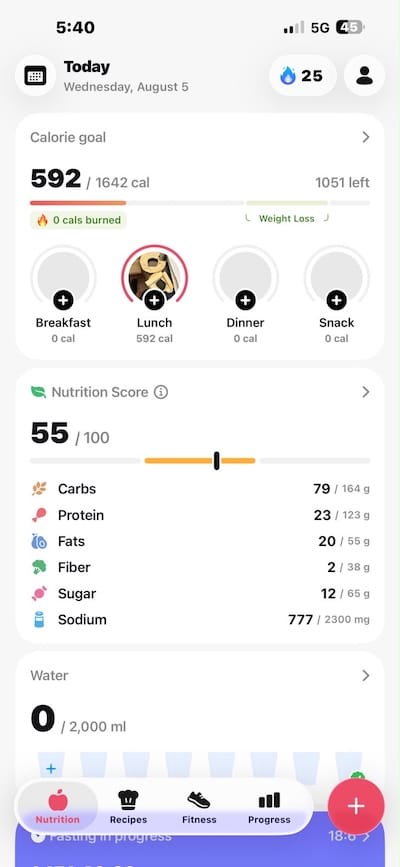
The project started with a screenshot from a friend’s food tracking app. His app was way more sophisticated than what I needed, but the screenshot gave me a really good starting point. I brought his screenshot into Claude Design and asked it to simplify the app into something closer to what I wanted. I explained the basic requirements and Claude Design gave me an initial mockup. We iterated a bit until we came up with something usable.
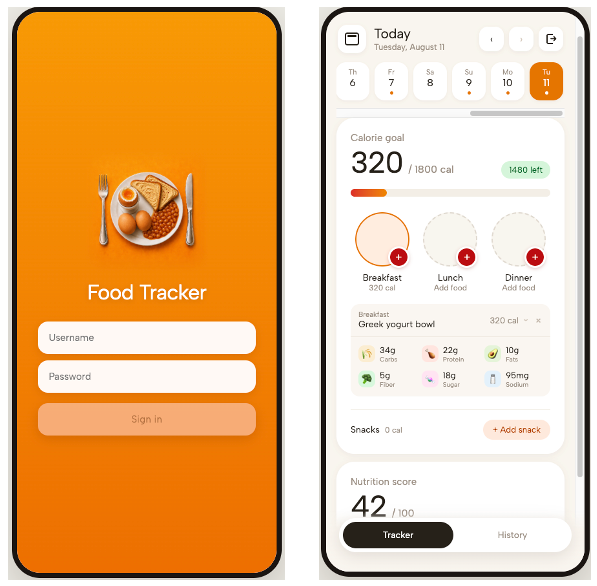
Once I was happy with the design, I had Claude Design package the files and provide some instructions for the design so that Hanz could use them to build a native app. Then, I used ChatGPT to create the app icon because I still think ChatGPT is the best image generation tool. For now.

After that, I went to Hanz and told him to act like a product manager first. I wanted him to review the design, review my requirements, and ask questions before we got started with actually building the app. He came back with questions about who would use it, whether it was private or public, what version one should track, how photos should work, what should happen if AI analysis failed, how Arnold should access the data, and what rules should exist around editing or deleting entries.

Planning like this is what makes AI agents actually useful in startups. You still need humans for product judgment because the AI can be quite stupid when asked to make judgment calls. The agent can help organize the work, but you have to give it a clear boundary and push it to find gaps before coding starts.
Once the product decisions were clear, I asked Hanz break the build into phases. This is wht he came up with:
- Preflight, access, and baseline
- Backend foundation: schema, auth, goals, and tests
- iOS vertical slice: login and note-only food log
- Photo upload, private storage, and AI estimates
- History, snacks, delete, and Arnold API
- Design polish, TestFlight, and final QA
Each phase became a Trello card with scope, steps, and verification requirements. Then I asked Hanz to review and improve the phases. And then I asked him to do it a second time to make sure everything was tight and that there were no gaps.
The phase breakdown made the chopping wood part possible. The next day, I wasn’t making architecture decisions between splitting logs because we had already done all that while we were planning. I was mostly telling Hanz to start a phase, review the phase, check it against the requirements, fix what needed fixing, and move to the next one. And check the current phase againts previous phases to make sure everything is coming together properly.
The iOS app stayed simple
The app itself is native SwiftUI, a decision Hanz made. His reasoning was that because this was a private iPhone app distributed through TestFlight, it made sense to use SwiftUI. I didn't question his logic. We were building something my wife and I could actually use on our phones. The iOS app handles login, session restore, Keychain token storage, the daily tracker screen, the history screen, adding food, capturing photos, selecting photos from the library, showing analysis states, deleting entries, and retrying failed analysis.
The important decision Hanz made was to keep business logic out of the iOS app wherever possible. The app doesn’t own the nutrition logic, it doesn’t calculate the nutrition score, it doesn’t decide whether a photo belongs to me or my wife, it doesn’t call OpenAI directly and it doesn’t contain any AI provider credentials. It mostly renders backend-owned state and sends authenticated food entries to the backend.
Arnold will eventually use the same backend. If the app and Arnold calculate things differently, the system gets messy quickly. So the backend owns the important rules, and the iOS app stays focused on the mobile experience and displaying the data for us.
Cloudflare was enough backend
For the backend, we used Cloudflare Workers, D1, and R2. I had a hand in this decision, but not in deciding on specific Cloudflare tech. I know Slobodan decided to use Cloudflare to build Competitor Tracker, and I figured that if it was good enough to use for Competitor Tracker, it would be good enough to use for my little food tracking app.
Hanz explanation for how this works: "Workers run the API. D1 stores structured data like users, sessions, nutrition goals, food entries, photo metadata, and audit events. R2 stores the private meal photos. The backend owns authentication, session validation, user scoping, day and history aggregation, snack labels, AI analysis state, photo authorization, nutrition summaries, and audit metadata. One small decision we made was that we didn’t create mutable daily summary rows in version one. Day and history totals are computed from food entries. For a small private app, that’s simpler and less fragile than maintaining a separate summary cache that can get out of sync."
Private photos needed real privacy
Food photos are personal enough that I didn’t want public image URLs floating around. So Hanz decided that Photos should be stored in a private R2 bucket. The API returns authenticated image handles instead of raw storage keys or public bucket URLs. When the app needs to show a meal photo, it asks the backend for the image with a valid session token. The backend checks ownership before returning anything.
We also split the image handling into practical variants. The app doesn’t need a giant original image just to show a small meal card, but the AI analysis part works better with a higher image quality. So the system can keep a display version for the app and a better version for analysis. These are some boring implementation detail, but it's something that helped make the app feel a little quicker and more secure. If an app is dealing with personal data, even casually personal data, you have to think about where the data goes and who can fetch it.
AI analysis lives on the backend
The AI nutrition estimate happens on the backend. The app uploads a photo, a note, or both. The backend stores the entry, calls the vision model, and updates the entry with a short title, calories, macros, confidence, and the raw analysis data we may need for debugging later.
If I upload a photo and write “250g chicken breast,” the note should be more important than the model guessing the size of the chicken breast from the picture. So the prompt had to be tuned around that. The model needed to use the photo and note together, count visible items, include sauces and sides, avoid being too conservative, and return short titles that looked good in the app. This took a little bit of iteration. The first AI estimates were directionally ok, but the app needed to be useful in normal family life and as close to possible to the real nutritional values of the things we were eating.
Failure handling was also part of the product. If AI analysis fails, the food entry stays. It gets marked as failed, and we made a little "retry" button to resubmit the request. Later we added better retry and reanalysis behavior so entries don’t sit in a weird pending state forever.
Arnold gets an API
One of the reasons I wanted my own app is Arnold. Arnold isn’t going to sit there tapping around an iPhone app. If he’s going to help us with food tracking, he needs backend access directly. So we built admin-style API endpoints for agent use. Arnold can eventually read users, read day and history data, add historical entries, update calorie goals, and request reanalysis. There are boundaries around this of course. If an agent creates data, that should be visible in the audit trail. If an agent deletes or overrides something, there should be a reason and a guardrail. All of this was Hanz' thinking, I won't pretend like I came up with it.
This connects to the bigger CofounderGPT experiment we're doing here. We’re already seeing this with AI agents that we're using to build our next startup. Agents shouldn’t always be treated like fake humans clicking around dashboards. Sometimes the better product decision is to give them a controlled API with permissions and audit trails. That’s the same reason we built an MCP server for Competitor Tracker. Software is becoming more agent-first, and the products we build should assume that agents will be users too.
TestFlight for the distribution layer
For distributing the app, we used TestFlight. That gave us the right level of seriousness for a private app and I wanted a native app rather than a web app with an icon on my homescreen. This was actually part of the experiment I was doing during the weekend: can I build a native iOS app with an AI agent? I never tried building a native app with an agent before so this seemed like a nice weekend project to see how hard it would be.
TestFlight still comes with Apple setup work. You need full Xcode, simulator runtime, signing, archive/upload, App Store Connect, export compliance, internal testers, and build readbacks. We almost hit one of the early process mistakes here, but I caught it in time by hammering Hanz to make a list of things he needed from me before getting started. Xcode wasn’t fully ready when it should’ve been. Hanz had checked some local tooling, but full iOS delivery needs more than “Swift works.” You need the full Xcode setup, simulators, signing path, upload path, and enough disk space. Since Hanz’s Mac mini is in Montreal and I was leaving for the cottage, anything that required me physically touching that computer had to be handled before I left. So we managed to finalize all of that and get everything on the Mac Mini working properly before I left.
QA made it usable
One of the most important technical lessons from the project was quality assurance. After Phase 3, Hanz was initially a little overconfident with the result. Backend tests were passing and the simulator launched to the login screen. That sounded good, but it wasn’t enough. A login screen doesn’t prove login works and it doesn’t prove Keychain token storage works. I pushed back, and Hanz corrected the process.
The useful proof required a signed simulator build, local Wrangler, dummy local credentials, login, Keychain save, day fetch, note-entry creation, and D1 readback showing the app-created row existed. That became the standard: don’t prove that the app opened; prove that the flow works.
After that, the QA bar got much better. Hanz ran backend tests, typechecks, D1 migration checks, secret scans, local Worker smokes, public Worker smokes, private photo authorization checks, user isolation checks, Arnold/admin checks, Release simulator builds, signed runtime checks, visual QA against the SwiftUI components, App Store Connect readbacks, and Trello handoffs with evidence.
That sounds like a lot for a weekend app, but it’s exactly why the weekend app became something my wife and I could use. Agents are very good at producing something that looks finished. They’re also very good at telling you it’s finished before the actual user flow works. The only reliable answer is evidence and that comes from testing the app.
The build got better through iteration
The first TestFlight build was far from perfect. Build 1 and Build 2 were processed by App Store Connect, but that only meant Apple processed the binary. It didn’t mean the product was usable. Luckily, Hanz handled all of that before it even got to me. Independent review (a.k.a. Hanz' testing subagents) caught blockers, so Hanz kept going and improving the app. Build 3 became the first corrected internal build. Build 4 made the camera the primary photo flow. Build 5 fixed nutrition score, snack labels, and the add-food flow. Later builds improved image handling, estimates, retry states, date rollover behavior, and the camera/library choice.
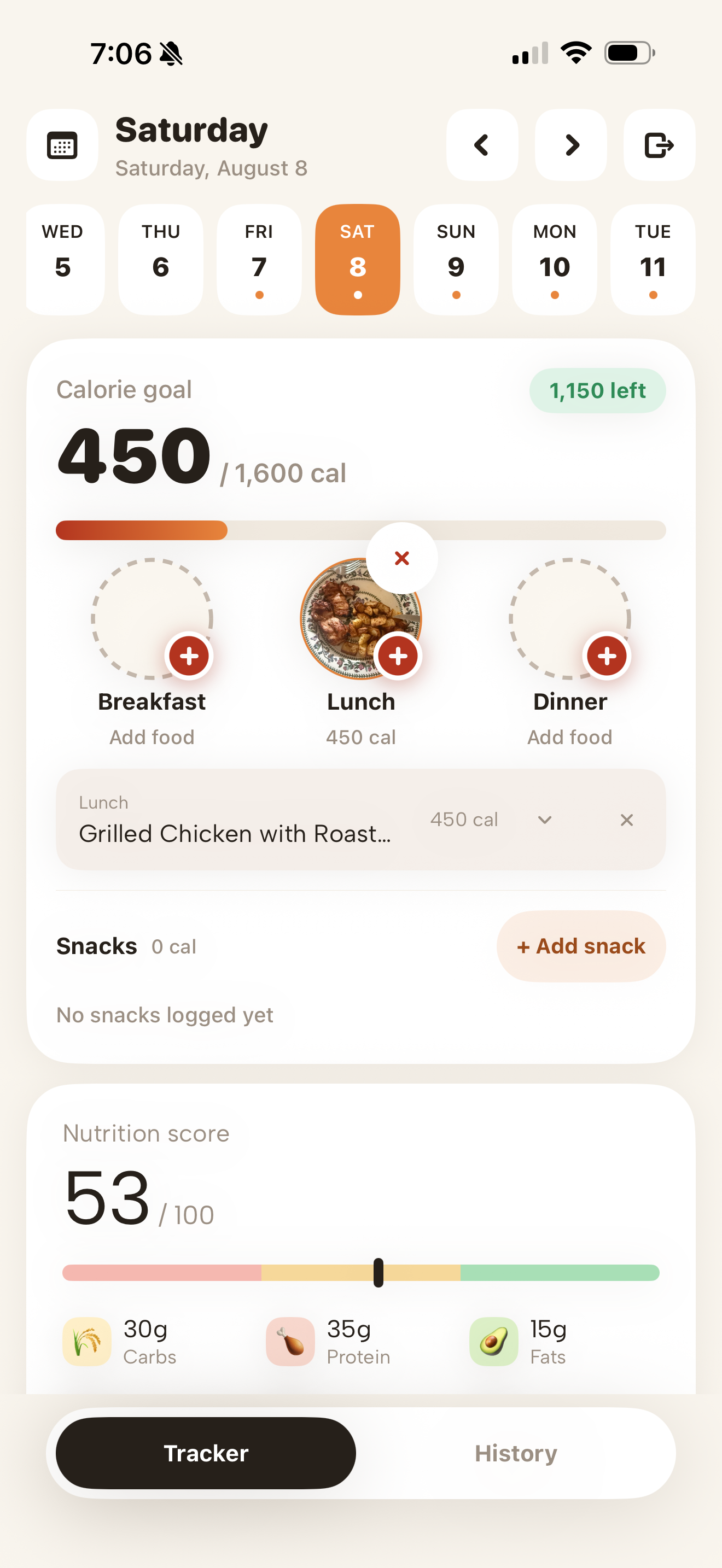
Agent-built software gets better through a loop: you build, review, test, fix, upload, expire old builds, and keep going.
What I would repeat
If I were doing this again, I’d repeat the same basic model I used. Start with clear specifications and a detailed plan broken up into phases. Use the smallest stack that can do the job properly for what you're trying to do. Keep the app as simple as possible. Put the important stuff in the backend because its easier to fix and improve the backend than to keep pushing new versions of the app to Testflight. Always keep personal data private by default. Give agents controlled APIs where it makes sense. Use Trello or something similar to manage the details of the project so the work has durable context. And most importantly, make the agent prove the thing works before you even open it to start testing it yourself.
A few years ago, there is no way I could have built a private native food tracking app for my family over a weekend by myself. I would have needed a team for that. Now I can, if I use my agents properly and keep the scope under control.